



Designed by caregivers. Built for caregivers. Made for those they love.
AI-powered situational awareness
understand, act, anticipate, predict.
- At home or in a senior living community
- Indoors or outdoors
- Active and independent or
- Navigating age related challenges
Theora Care’s AI advanced technology keeps you connected, confident, and living your best life.
Meet the Theora Care System that Allows Older Adults and Caregivers to Live with NO FEAR.
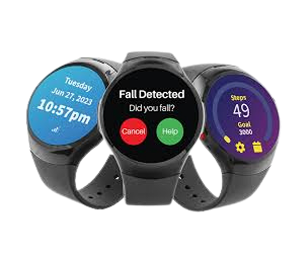
Wearable
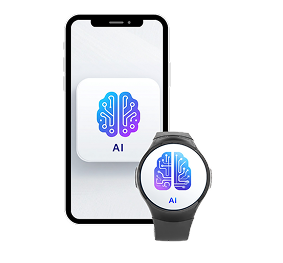
AI Predictive Technology
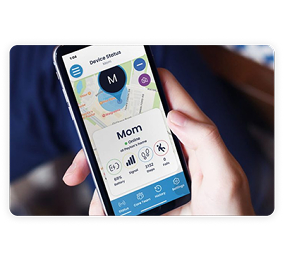
Caregiver App
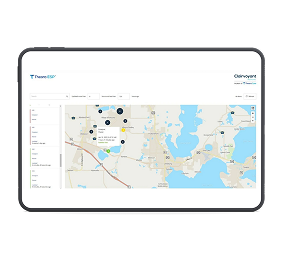
DATA
Caregiving Technology Solutions at Home or in the Community
Theora is your partner in building an advanced technology foundation for a better quality of life (QoL).
Empower your caregiving staff with our advanced technology tools that increase resident and client independence while reducing issues such as falls, wandering and sedentary lifestyles.
Our comprehensive platform helps our business partners to increase situational awareness, optimize quality health outcomes while also reducing staff burden.

Live independently with confidence. Whether you are an active senior, solo ager or caring for a loved one, our advanced technology keeps you connected and supported.
Our smart wearables and apps allow wearers to have freedom indoors and outdoors while maintaining hands-free, automatic, 24/7 connection to caregivers in case of emergencies.
Partners That Trust Theora Care
Join the growing community of brands that rely on us.


Theora Care In the News

Frequently Asked Questions
What makes the Theora Connect smartwatch different from others on the market?
Our smart wearable is not an “off-the-shelf” solution, it is based on our advanced situational awareness technology. But the technology is just the foundation upon which to build a better quality of life. We intentionally co-designed our products and platform by caregivers for caregivers and with older adult lifestyles and needs in mind. Whether you are an active older adult, living with dementia or a caregiver wanting to give an older adult independence without sacrificing connectivity, communication and safety, Theora delivers the solution.
How does Theora support businesses in aging and long-term care?
We have designed a platform that provides advanced technology for situational awareness that enhances the personalized data businesses can use to elevate the quality of life for their residents and clients. We work with senior living operators, home care agencies, adult day care services, law enforcement and nonprofit organizations to extend quality of life for older adults.
What are the main goals of the Theora smart wearable and system?
We see Theora as the main foundation for having quality of life longer. Just as when you build a house, you need a strong foundation first and for older adults we provide that foundation. For individuals, we want to provide technology that is advanced but easy to use and allows older adults to have independence while staying connected. For businesses, we offer a platform that has inter-operability to work with other tech solutions for a seamless dashboard of information that enhances your services, quality of life outcomes and reduces staff burden.
Let's get into the details of some of the compared features.
Price
Apple smartwatches average between $399 to $949 at the time of this writing, with additional cellular subscriptions ranging between $10 and $25 a month depending on the carrier. The Theora Connect smartwatch is $297.97, with a one-time activation fee of $39.97 and a $29.97 monthly service fee, which includes cellular. Most of our customers add our $10/ month smart fall detection as well. Both the Theora Connect and Apple Watch have monthly cellular subscriptions.
Fall Detection
The Theora Connect has AI-powered, highly accurate fall detection that not only detects a fall but also analyzes what happens before and after a fall to reduce false positives. It can detect both soft falls (falling onto an elevated or soft surface) and hard falls (falling all the way to the floor). After a fall is detected, the wearer is given ten seconds to respond yes or no to “Have you fallen?” before a call is automatically initiated to the pre-designated caregiver or family member; then all caregivers on the list are notified of a fall detected. The Theora Connect is the only Smart Fall Detection that can both predict and detect falls with a >95% accurate false/positive rating – greatly surpassing other smartwatches' detection accuracy.
The Apple Watch Series 12 detects hard falls and gives the wearer one minute of no activity before initiating a call to an emergency contact. If movement is detected, then the watch won't call. If the one minute elapses, then emergency services are called. After the call ends, all of your emergency contacts are notified by text. An emergency call can be self-initiated by pressing and holding down the side button.
For family caregivers, being notified quickly about a loved one's well-being after a fall is important to quickly get them the help they may need, and be informed of any injuries. Caregivers in the loop can advocate for their older loved ones and help support the care provided by doctors and emergency services, especially if the loved one has cognitive challenges. Being in contact can also provide emotional support and reassurance for both the older adult and caregivers while help is on the way. An important consideration for caregivers is the ease of use in initiating an emergency call by an older adult. For seniors with mobility issues or grip strength, holding down a button could be out of the question, or with cognitive challenges, they may not know what they should do to initiate a call. The Apple Watch does have a voice-activated assistant if that feature is enabled; in contrast, the Theora Connect has a clearly labeled red SOS button that is intuitive and easy to use. It is especially easy for people living with Alzheimer’s or dementia to respond with clearly marked signs.
Activity Tracker
Theora Connect smartwatch has a step counter that is accessible on the watch. The step count data and GPS location are also tracked on the caregiving companion app, Theora Link Pro. Caregivers can see daily changes or spot anomalies in the watch's full history. Sudden increases or decreases in step count can prompt caregivers to take a closer look or provide additional care as needed. An alert is also sent to caregivers when the watch is taken on or off the charger to monitor whether normal activity is happening.
The Apple Watch Series 12 has highly sensitive fitness tracking, which provides data on everything from step count to how often you sit down or specialized tracking on over 75 individual sports or exercises. Data from the Apple Watch can be sent to an iphone for further analysis on a larger screen. The Apple Watch also provides optional health reminders to meet your goals.
The question for caregivers is what level of activity tracking your loved one will actually use. Seniors with Alzheimer’s disease or dementia can find additional apps, settings, or complicated swipes more frustrating than helpful if the feature ultimately never gets used. If your loved one is very active and loves to track their progress, then an Apple Watch is a great option, and the higher price makes sense, but if you want to just keep track of your loved one's movement during their daily activities and they want to track their steps, then the Theora Connect might be the right fit for you.
Cellular Calling
All Theora Connect smartwatches have cellular calling and a monthly service fee; it is a standalone device and does not require a phone to be on the wearer. The cellular fee is to support GPS location, caregiver alerts, safe zone wandering alerts, and emergency SOS calling to keep caregivers connected to their loved ones. Theora Connect smartwatches can also be connected to wifi. Caregivers can create a list of contacts (unlimited additions) on the Theora Link Pro caregiver app so the wearer can call friends and family. The watch will not receive any calls from numbers that are not on the contact list created by the caregiver, so no worries about SPAM or SCAM callers.
Not all Apple Watches have cellular calling enabled, which includes the Series 12. GPS and cellular calling are added at the time of purchase for an additional price, plus a cellular monthly subscription. Watches that don't have cellular calling require an iPhone to be on the person, and the watch must be connected to the phone's hotspot or local wifi. This means that in the event of an emergency, only emergency services can be contacted until the watch is reconnected to wifi. Monthly costs for cellular service vary by provider. When cellular calling is enabled, the wearer can dial any number or call from their saved contact list. FaceTime, conference calls, and group FaceTimes are available.
GPS Location & Wandering
For older adults, location and wandering are critical information, especially if the wearer has cognitive issues. Theora Connect uses GPS on the go and wifi to let you know if the watch is within your network to locate the watch. Caregivers receive a location update every 15 minutes, or in emergencies every 3 minutes. All changes are logged in the history tab of the caregiver app. The GPS location is also used for Safe Zone wandering alerts. Caregivers can set a radius of 500 ft, or smaller if the Safe Zone is connected to a building's Wi-Fi, all the way up to 5 miles. If the watch wearer enters or exits a Safe Zone, the caregiver is alerted. Safe Zone alerts and GPS location can be used to quickly alert caregivers of wandering and locate the wearer during a dementia wandering incident. In addition to caregiving features, GPS location is used for local weather updates on the watch.
The Apple Watch uses GPS location for a variety of services, not limited to Google Maps, the weather app, and Find My Services. It is mainly used for fitness and activity tracking.
Both watches use GPS location (if enabled on the Apple Watch 12) to locate the watch, update the time and weather, and can be accessed by caregivers as needed. The biggest difference is that the Theora Connect sends location updates to caregivers every fifteen minutes, whereas caregivers must actively check to see the location of a loved one when they discover they may not be where they should.
Physical Watch Features
Both smartwatches have LED digital screens as watch faces, external buttons, and use shake-to-wake and touch to navigate.
The Theora Connect has two external buttons: the black power button and the red SOS button. The red SOS button is clearly marked SOS, so even older adults with cognitive difficulties like dementia and Alzheimer’s will know to use it if they need help. The Theora Connect watch face information is large, as eyesight and dexterity can decline with age. The communication function is easy with both touch and voice capability, but in cases of emergency, the smartwatch contacts the designated caregiver if the wearer does not answer. It is lightweight on the wrist since heavier watches can become uncomfortable, and has the option for a locking watch band to ensure caregivers can locate a loved one who has a tendency to leave things behind or wander.
The Apple Watch Series 12 is also very lightweight, with many interchangeable watch bands for personalization (no locking band available), and a compact rectangular screen. The external button has a variety of functions, including power, navigation, Apple Pay, and communication. The Apple Watch comes with over 40 apps right out of the box. To contact emergency services on the Apple Watch, “press and hold the watch's side button (the button below the Digital Crown) until the Emergency Call slider appears. On Apple Watch Ultra models, you can also press and hold the Action button. Drag the Emergency Call slider to start the call immediately. Or you can keep holding the side button; after a countdown, your watch calls emergency services automatically.”